T-HFND-006-019
In this activity, you will learn how to add a colour card to your project when exporting animation without a background.
The Colour Card allows you to fill the scene's background with a solid colour when there is no background image. If no drawing or colour-card is present to cover the scene's background, the scene will be rendered on a pitch black canvas.
Material
- Your Bouncing_Ball scene from Activity 2.
How to add a colour card
- Start Harmony and open your Bouncing_Ball scene.
- To add a colour card to your project, do one of the following. It does not matter where the colour card sits in your layer stack as it is automatically positioned to be furthest back.
- In the Timeline view, right-click on the layer stack and select Insert > Colour-Card.
- In the Timeline view menu, select Insert > Colour-Card.
- In the Timeline layer toolbar, click the Add Layer
button and select Colour-Card.
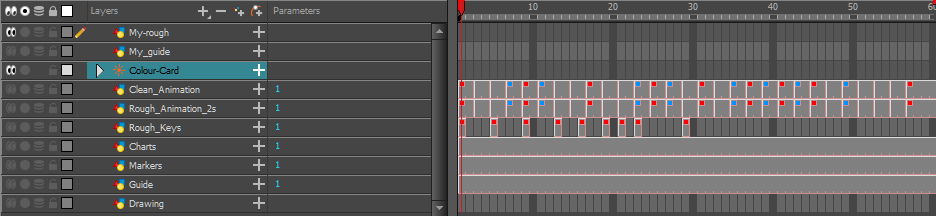
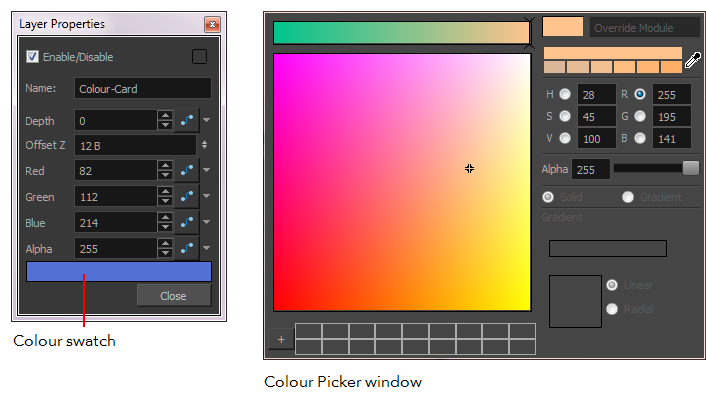
- The set the background colour, right-click on the Colour Card layer and select Layer Properties
How to export your project
- Select File > Export > Movie.
- In the Output options, name your movie Bouncing_Ball and select its destination folder.
- In the Export Range, select the All option.
- Keep the resolution the same as the scene’s resolution.
- In the movie Options, keep the settings as they are.
- Deselect the Sound and Prepare for Internet Streaming options.
- Click OK and render your project.
- Play your rendered animation.
Next Module
Introduction to Paperless Animation Ink and Paint with Harmony Advanced and Premium
Topics List
- About Paperless Animation
- Timeline View
- Xsheet View
- About Marking Drawings
- Marking Drawings
- Extending the Exposure of Previous Drawings
- Using the Onion Skin
- Typing Exposure
- Creating Cycles
- Setting the Exposure
- Cleaning Animation
- Using the Light Table
- Activity 1: Rough Animation
- About Duplicate Layers
- Duplicating Layers
- About Colour Palettes
- About Colour Swatches
- Adding a Colour Swatch
- Adding a Gradient Colour Swatch
- Adding a Texture Colour Swatch
- Painting Multiple Drawings
- Activity 2: Changing the Colour of the Animation
- Activity 3: Adding a Colour Card and Exporting