T-HFND-004-002
The Tool Properties view contains the most common options and operations related to the currently selected tool. When you select a tool from the Tools toolbar, the Tool Properties view updates.
For example, if you choose the Select tool, the Tool Properties view will display the options and operations related to it, such as Snap to Contour, Apply to All Drawings, Flip Horizontal, and Flatten.
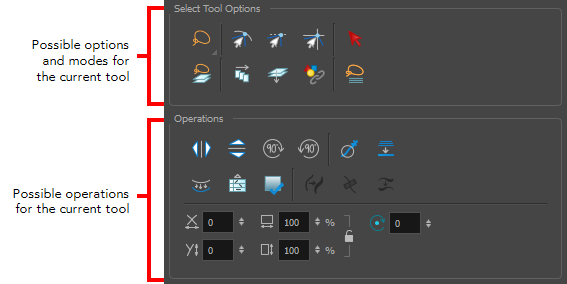
How to access the Tool Properties view
Do one of the following:
- From the top menu, select Windows > Tool Properties.
- From any of the other views, click the Add View
 button and select Tool Properties.
Next Topic
About the Brush Tool
Topics List
- Drawing with the Brush or Pencil Tool
- About the Tool Properties View
- About the Brush Tool
- Drawing with the Brush Tool
- Drawing with the Pencil Tool
- About the Select Tool
- Selecting
- About Shape Tools
- Drawing with the Rectangle, Ellipse, and Line Tools
- About the Cutter Tool
- Cutting Artwork
- About the Contour Editor Tool
- Reshaping a Drawing with the Contour Editor Tool
- About the Pencil Editor Tool
- Reshaping Pencil Lines
- About the Centerline Editor
- Reshaping Brush Strokes
- About the Eraser Tool
- Erasing
- Modifying the Eraser Settings
- Painting Drawings
- Inking Lines
- About the Stroke Tool
- Drawing with the Stroke Tool
- Closing Gaps
- About the Edit Gradient and Texture Tool
- Using the Edit Gradient and Texture Tool
- Activity 1: Basic Drawing