T-COMP2-002-005
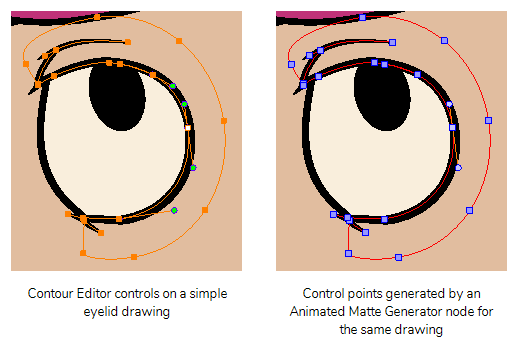
The Animated Matte Generator node converts the vector points of its source drawing into matte points. Those points can be animated, allowing you to freely morph the shape of the source drawing as your scene plays out.
You can animate the points of an Animated Matte Generator by displaying its controls in the Camera view, then moving them using the Transform tool. Moving and tweaking the contour points for an Animated Matte Generator works a lot like using the Contour Editor tool.
Next Topic
Displaying Animated Matte Generator Controls
Topics List
- Understanding Mattes and the Cutter Node
- Cutter Node
- Nodes With a Visible Matte Port
- Using Integrated Matte Ports
- Camera View Modes
- Drawn Mattes
- Gradient Node Mattes
- Turbulence Mattes
- Colour Override and Colour Selector Mattes
- About the Animated Matte Generator
- Adding an Animated Matte Generator Node
- About Matte Creation and Animation with the Animated Matte Generator
- Displaying Animated Matte Generator Controls
- Adding Points to an Animated Matte Generator
- Animating the Contour of an Animated Matte Generator Contour
- About the Outer and Inner Contours of the Animated Matte Generator
- Separating the Outer and Inner Contours of an Animated Matte Generator
- Animating Interpolated Contours with the Animated Matte Generator
- Creating a Feathered Effect with the Animated Matte Generator
- Connecting a Snapping Source Drawing to an Animated Matte Generator
- Making Matte Contours Snap to a Drawing
- Using Animated Mattes