T-COMP2-002-013A
In order for matte points and contours to snap to the contours of the snapping source drawing, you must use the Set to Snap mode of the Animated Matte Generator view to select which points and which contours of the matte should snap.
How to make an Animated Matte Generator snap to the contours of the snapping source drawing
- In the Node or Timeline view, select the Animated Matte Generator node.
- Display the controls of the Animated Matte Generator node by doing one of the following:
- In the Camera view toolbar, click on Show Control
 .
- From the top menu, select View > Show > Control.
- Press Shift + F11.
The control points for the Animated Matte Generator display in the Camera view.
- In the Tools toolbar, select the Transform
 tool.
- In the Editing Mode panel of the Animated Matte Generator view, select Define Matte Point
 .
- Adjust the contours of the matte so that they are close to the contours of the snapping source drawing. Contours and points will only snap if they are at a short distance from the contours of the snapping source drawing.
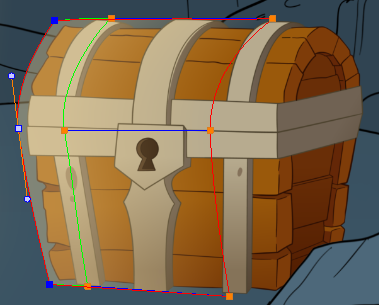
- In the Editing Mode panel of the Animated Matte Generator view, select Set to Snap
 .
Switches to enable or disable snapping appear over each of the matte's contours and points in the Camera view.
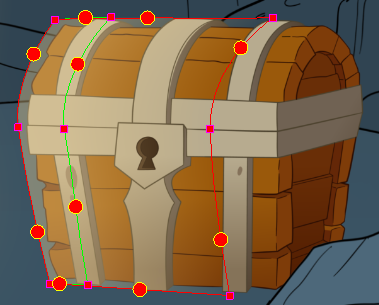
- In the Camera view, do one of the following:
- To enable or disable snapping on a matte point, click on its control point.
- To enable or disable snapping on a matte contour, click on the snapping switch for that contour.
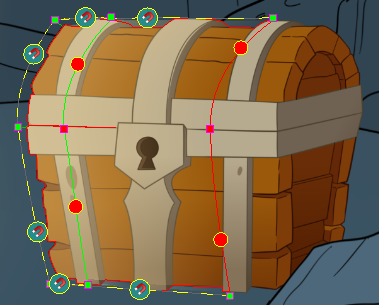
Points that are set to snap will appear green instead of purple. Contours that are set to snap will have a magnet icon on their snapping switch.
- If a point or contour does not snap to the contour of the snapping source drawing, adjust the position and curves of the matte so that they are closer to the contour of the snapping source drawing.
TIP: You can adjust the maximum distance from which a matte point or contour will snap to the drawing source, whether the matte should snap to all contours or only the outlines of the snapping source as well as which one of the snapping source's art layers the matte snaps to in the layer properties of the Animated Matte Generator.
Next Topic
Using Animated Mattes
Topics List
- Understanding Mattes and the Cutter Node
- Cutter Node
- Nodes With a Visible Matte Port
- Using Integrated Matte Ports
- Camera View Modes
- Drawn Mattes
- Gradient Node Mattes
- Turbulence Mattes
- Colour Override and Colour Selector Mattes
- About the Animated Matte Generator
- Adding an Animated Matte Generator Node
- About Matte Creation and Animation with the Animated Matte Generator
- Displaying Animated Matte Generator Controls
- Adding Points to an Animated Matte Generator
- Animating the Contour of an Animated Matte Generator Contour
- About the Outer and Inner Contours of the Animated Matte Generator
- Separating the Outer and Inner Contours of an Animated Matte Generator
- Animating Interpolated Contours with the Animated Matte Generator
- Creating a Feathered Effect with the Animated Matte Generator
- Connecting a Snapping Source Drawing to an Animated Matte Generator
- Making Matte Contours Snap to a Drawing
- Using Animated Mattes